 gh_docs_bot
GHP Static Site Generator - Architecture & Design
comprehensive architecture documentation for the GHP Static Site Generator (v1.x.x). It includes high-level concepts, data flow, internal components, and diagrams using Mermaid syntax (standard for GitHub Markdown).
Table of Contents
Architecture Overview
- Version: 1.x.x (Version 2.x.x updates see below)
- Language: C++23
- License: MIT
- command line tool
- Platform: Linux, macOS
System Overview
The GHP Static Site Generator is a high-performance console application designed to convert a recursive directory structure of content files into a fully navigational static HTML website. It supports Markdown (.md) for content authoring and raw HTML fragments (.htm) for custom layouts, wrapping them into a customizable Inja template.
Key Features
- Recursive Scanning: Maps arbitrary folder depths.
- Hybrid Parsing:
- *.md files are parsed to HTML via md4c.
- *.htm files are injected as raw content fragments.
- Automated Navigation: Generates a recursive Side-Nav HTML structure based on the file system.
- Root Isolation: Files in the root directory are generated but excluded from the navigation tree to keep the menu clean.
- Asset Management: Automatically copies theme assets (CSS, JS, Images) from a configured source.
- Templating: Uses Inja for variable substitution (Title, Navigation, Content, Base Path).
High-Level Architecture
The system operates on a linear Pipeline Pattern. It takes three primary inputs (Configuration, Content, Template) and produces a directory of static HTML files.
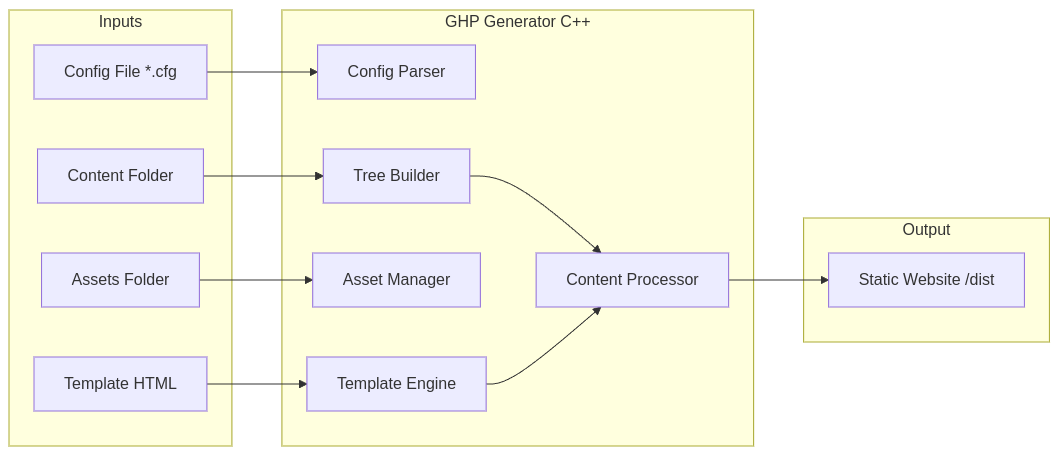
Core Workflow
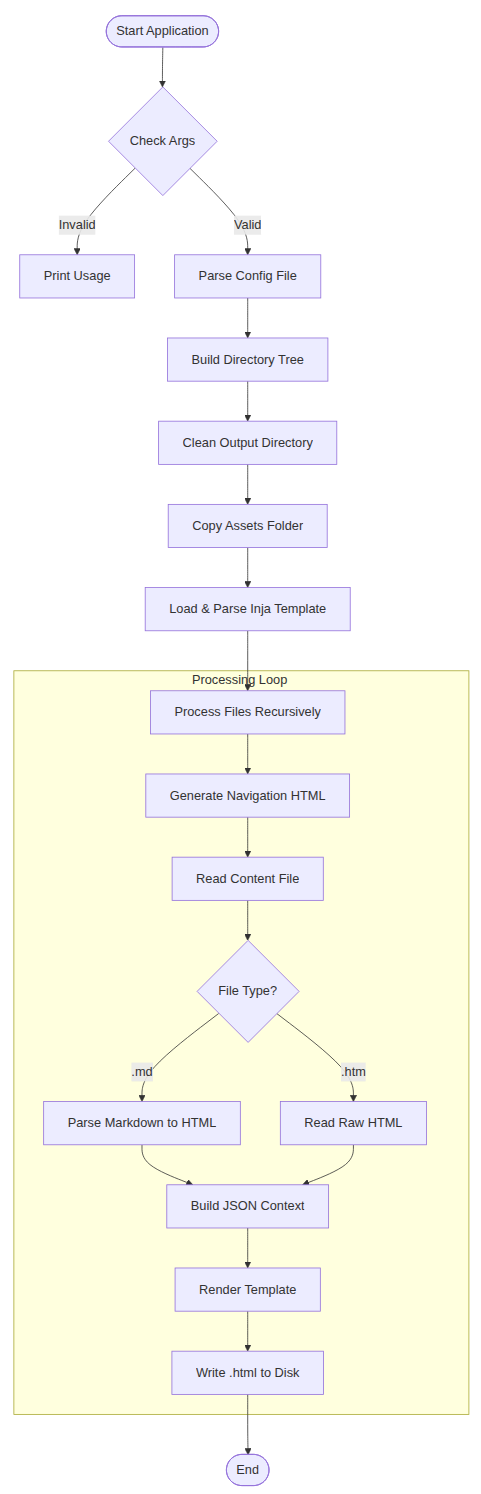
The main() function orchestrates the lifecycle of the generation process.
Execution Flow Diagram
Component Design
The application is structured around data-driven components.
Data Structures
DirNode (The File Tree)
Represents the recursive file system structure in memory.
struct DirNode {
  fs::path relativePath;        // Path relative to input root
  std::string dirName;          // Name of the current folder
  std::vector<fs::path> files;  // .md and .htm files in this folder
  std::vector<DirNode> subdirs; // Nested directories
};
Config
Holds runtime settings loaded from the .cfg file.
struct Config {
  fs::path templatePath; // Path to template.html
  fs::path outputDir;    // Destination folder
  fs::path assetsPath;   // Source assets folder (images/css)
};
Key Logic Units
Tree Builder (buildTree)
Role: Scans the input directory.
Filters:
- Ignores files/folders starting with . (hidden files).
- Ignores the folder named assets (to prevent recursion loops if source and output overlap, and to keep navigation clean).
- Only accepts .md and .htm files.
Sorting: Sorts directories and files alphabetically for consistent navigation order.
Navigation Generator (generateNavHtml)
Role: Creates the HTML
- structure for the sidebar.
Logic:
- Receives the full rootNode to generate the complete menu for every page.
- Root Exclusion: Accepts an isRoot flag. If true, files in the top-level directory (like index.md) are not added to the navigation list, but subdirectories are. This prevents the "Home" page or loose root files from cluttering the menu.
- Active State: Compares the current file path with the link target to add class="active" for CSS highlighting.
- Hierarchy: Renders folders as DirectoryName and nests files inside.
Content Processor
- Markdown: Uses md4c-html to convert Markdown text into safe HTML.
- HTML Fragments: .htm files are read as plain text and injected directly. This allows specific pages to use complex HTML layouts (grids, cards) that Markdown cannot express.
Template Injection (Inja)
Merges the processed data into the HTML skeleton.
JSON Context Data:
- base_path: Relative path back to root (e.g., ../../) for linking CSS/JS correctly from subfolders.
- title: Filename without extension.
- navigation: The generated sidebar HTML string.
- content: The converted page body.
File System Structure
Input Structure (Example)
docs/
├── architecture
│   └── overview.md
├── howtos
│   ├── github_action.md
│   └── static_website.md
├── index.md
└── screenshots
    └── themes.htm
Design Structure (Example)
theme/blue/
├── assets
│   ├── css
│   │   └── main.css
│   ├── favicon.ico
│   ├── favicon.svg
│   ├── img
│   │   ├── blue_dark.png
│   │   ├── blue_light.png
│   │   ├── favicon.svg
│   │   ├── matrix.png
│   │   ├── themes.png
│   │   └── tron.png
│   └── js
│       └── main.js
├── assets copy
└── blue.cfg
Output Structure (Example)
/dist/
├── architecture
│   └── overview.html
├── howtos
│   ├── github_action.html
│   └── static_website.html
├── index.html
└── screenshots
    └── themes.html
Dependencies & Libraries
Library Purpose Rationale std::filesystem File I/O C++ Standard (modern, cross-platform). nlohmann/json Data Structure Standard for passing data to template engines. pantor/inja Templating Fast, Python/Jinja2-like syntax for C++ md4c Markdown Extremely fast, compliant C markdown parser Configuration Reference
[General]
template=docs/theme/desktop/fluid_template.html
assets=docs/theme/fluid/assets
output=docs/dist
base_path=https://zheng-bote.github.io/gha_ghpages/
toc=true

[plugins]
path=docs/ssg/plugins
enabled=markdown, html, toc, asciidoc, search, sitemap, mermaid, breadcrumb, reading_time, shortcode, minify, office, info, emoji

[reading_time]
threshold=200
wpm=200
Build & Deployment
Compilation
Requires a C++23 compliant compiler (GCC/Clang) and the linked libraries.
Linux Example:
g++ -std=c++23 -o ssg main.cpp -lmd4c-html -lmd4c![TIP] see
CMakeLists.txtfor more detailsExecution
Usage: build/gh_docs_bot <path_to_config> <input_folder>Example
./gh_docs_bot docs/themes/fluid/fluid.cfg docs/documentsInputs
Input Description path_to_configPath to the config file to use for the site. path_to_docsPath to the input directory to use for the site.