a powerful image management tool for Linux, MacOS and Windows
Architecture
Based on the codebase we have built, the architecture of Desktop-Gallery
is a modular, event-driven desktop application leveraging Qt's
Model-View-Controller (MVC) framework.
Developed for Linux, macOS, and Windows.
Architecture Overview
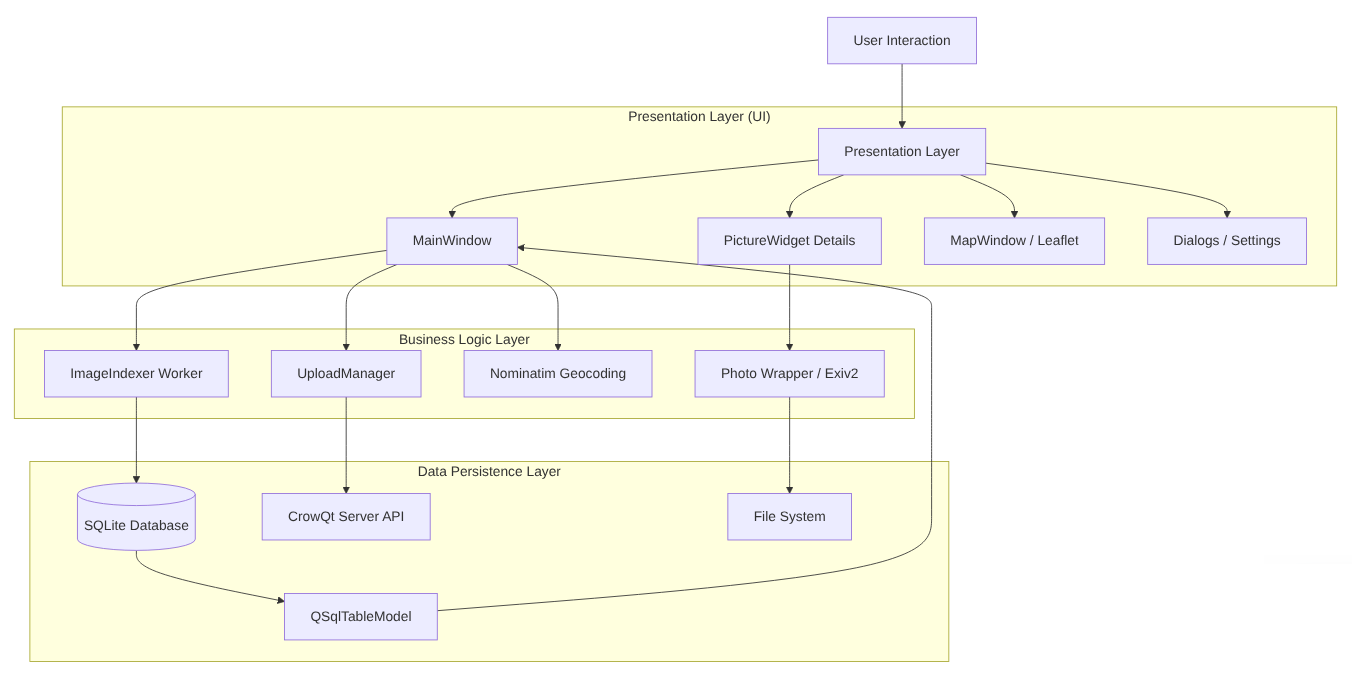
The application is structured into three main layers:
Presentation Layer (UI)
Handles user interaction, views (Gallery, Map, Details), and dialogs.
It uses Qt Widgets.
Business Logic Layer
Handles the "heavy lifting" like image processing, metadata editing,
uploading, and geocoding. This layer is often multithreaded.
Data Layer
Manages persistent storage (SQLite database), file system access, and
configuration settings.
System Architecture Diagram
This diagram visualizes how the different classes and modules interact
with each other.
Detailed Component Breakdown
Main Window & Navigation (The Controller)
MainWindow:
The central hub. It orchestrates the entire application flow. It
initializes the database, manages the layout (QSplitter), creates
menus, and handles global events (like language switching).
LoginDialog: A modal dialog for
authenticating with the CrowQtServer.
Data Models (The "M" in MVC)
DatabaseManager: A Singleton class that
wraps the SQLite database (gallery_cache.db). It handles connection
opening/closing and schema creation.
QSqlTableModel: A Qt class that provides
a direct link between the SQLite database and the UI views. It holds
the image data (path, metadata, etc.).
QStandardItemModel: Manages the folder
structure tree view on the left side.
Views & Delegates (The "V" in MVC)
QListView (Gallery View)
Displays the grid of images.
ThumbnailDelegate: A custom painter that
renders the thumbnails, borders, and text overlays (Copyright/GPS)
directly onto the QListView. It uses QPixmapCache for performance.
QTreeView: Displays the file system
folder hierarchy.
MapWindow: Embeds a QWebEngineView to
display OpenStreetMap/Leaflet.js for visualizing GPS coordinates.
Workers & Logic (Business Logic)
ImageIndexer: A QRunnable (runs in a
background thread via QThreadPool). It recursively scans folders for
images, extracts metadata, and populates the database. This prevents
the UI from freezing during large imports.
UploadManager: Handles the communication
with the CrowQtServer. It manages the upload queue, performs
authentication (JWT/Refresh tokens), and builds Multipart HTTP
requests.
Photo (Wrapper): A utility class that
wraps Exiv2. It provides a high-level API to read/write EXIF, IPTC,
and XMP metadata, rotate images, and export to WebP.
rz_metadata: A static configuration
namespace defining valid tags, mappings (Sync Rules), and default
values.
External Services:
Nominatim (OSM): Accessed via
QNetworkAccessManager for Reverse Geocoding (converting GPS coords
to Address).
CrowQtServer: The remote backend (REST
API) for uploading images.
Data Flow Example: Importing Images User Action: User clicks
"Open Folder (Recursive)".
Controller: MainWindow starts an
ImageIndexer task in the global QThreadPool.
Worker: ImageIndexer iterates through
files.
Helper: For each file, Photo reads
metadata (EXIF/XMP).
Database: ImageIndexer inserts records
into the SQLite DB via DatabaseManager.
View Update: The QSqlTableModel detects
changes in the DB and signals the QListView.
Rendering: ThumbnailDelegate paints the
new thumbnails in the grid.